LovenseLocalAPI
By local application
If the user's device is in the same LAN environment, a POST request to Lovense Remote can trigger a toy response. In this case, your server and Lovense's server are not required.
If the user uses the mobile version of Lovense Remote app, the domain and httpsPort are accessed from the callback information. If the user uses Lovense Remote for PC, the domain is 127-0-0-1.lovense.club, and the httpsPort is 30010
With the same command line, different parameters will lead to different results as below.
GetToys Request
Get the user's toy(s) information.
API URL: https://{domain}:{httpsPort}/command
Request Protocol: HTTPS Request
Method: POST
Request Content Type: application/json
Response Format: JSON
Headers:
| Name | Description | Note | Required |
|---|---|---|---|
| X-platform | The name of your application | Will be displayed on the Lovense Remote screen. | yes |
Parameters:
| Name | Description | Type | Note | Required |
|---|---|---|---|---|
| command | Type of request | string | / | yes |
Request Example:
{
  "command": "GetToys"
}
Response Example:
{
  "code": 200,
  "data": {
    "toys": "{  \"f082c00246fa\" : {    \"id\" : \"f082c00246fa\",    \"status\" : \"1\",    \"version\" : \"\",    \"name\" : \"nora\",    \"battery\" : 60,    \"nickName\" : \"\",    \"shortFunctionNames\" : [      \"v\",    \"r\"    ],    \"fullFunctionNames\" : [       \"Vibrate\",    \"Rotate\"    ]  }}",
    "platform": "ios",
    "appType": "remote"
  },
  "type": "OK"
}
GetToyName Request
Get the user's toy(s) name.
API URL: https://{domain}:{httpsPort}/command
Request Protocol: HTTPS Request
Method: POST
Request Content Type: application/json
Response Format: JSON
Headers:
| Name | Description | Note | Required |
|---|---|---|---|
| X-platform | The name of your application | Will be displayed on the Lovense Remote screen. | yes |
Parameters:
| Name | Description | Type | Note | Required |
|---|---|---|---|---|
| command | Type of request | string | / | yes |
Request Example:
{
  "command": "GetToyName"
}
Response Example:
{
  "code": 200,
  "data": ["Domi", "Nora"],
  "type": "OK"
}
Function Request
API URL: https://{domain}:{httpsPort}/command
Request Protocol: HTTPS Request
Method: POST
Request Content Type: application/json
Response Format: JSON
Headers:
| Name | Description | Note | Required |
|---|---|---|---|
| X-platform | The name of your application | Will be displayed on the Lovense Remote screen. | yes |
Parameters:
| Name | Description | Type | Note | Required |
|---|---|---|---|---|
| command | Type of request | string | / | yes |
| action | Control the function and strength of the toy | string | Actions can be Vibrate, Rotate, Pump, Thrusting, Fingering, Suction, Depth, Stroke, Oscillate or Stop. Use All to make all functions respond. Use Stop to stop the toy’s response. Range: Vibrate:0 \~ 20 Rotate: 0\~20 Pump:0\~3 Thrusting:0\~20 Fingering:0\~20 Suction:0\~20 Depth: 0\~3 Stroke: 0\~100 Oscillate:0\~20 All:0\~20 ⚠️ Stroke should be used in conjunction with Thrusting, and there should be a minimum difference of 20 between the minimum and maximum values. Otherwise, it will be ignored. | yes |
| timeSec | Total running time | double | 0 \= indefinite length Otherwise, running time should be greater than 1. | yes |
| loopRunningSec | Running time | double | Should be greater than 1 | no |
| loopPauseSec | Suspend time | double | Should be greater than 1 | no |
| toy | Toy ID | string / array | If you don’t include this, it will be applied to all toys. For version 7.71.0 and above, an array of toy IDs can be sent in this request. | no |
| stopPrevious | Stop all previous commands and execute current commands | int | Default: 1, If set to 0 , it will not stop the previous command. For example: Sent "Vibrate10" to Nora. With new command "Rotate20": stopPrevious:1 → Only Rotate20 stopPrevious:0 → Rotate20 + Vibrate10 | no |
| apiVer | The version of the request | int | Always use 1 | yes |
The stopPrevious parameter is available in the following versions: Android Remote 5.2.2, iOS Remote 5.4.4, PC Remote 1.6.3.
Request Example:
// Vibrate toy ff922f7fd345 at 16th strength, run 9 seconds then suspend 4 seconds. It will be looped. Total running time is 20 seconds.
{
  "command": "Function",
  "action": "Vibrate:16",
  "timeSec": 20,
  "loopRunningSec": 9,
  "loopPauseSec": 4,
  "toy": "ff922f7fd345",
  "apiVer": 1
}

// Vibrate 9 seconds at 2nd strength
// Rotate toys 9 seconds at 3rd strength
// Pump all toys 9 seconds at 4th strength
// For all toys, it will run 9 seconds then suspend 4 seconds. It will be looped. Total running time is 20 seconds.
{
  "command": "Function",
  "action": "Vibrate:2,Rotate:3,Pump:3",
  "timeSec": 20,
  "loopRunningSec": 9,
  "loopPauseSec": 4,
  "apiVer": 1
}

// Vibrate 9 seconds at 2nd strength
// The rest of the functions respond to 10th strength 9 seconds
{
  "command": "Function",
  "action": "Vibrate:2,All:10",
  "timeSec": 20,
  "loopRunningSec": 9,
  "loopPauseSec": 4,
  "apiVer": 1
}

// Thrust 20 seconds at 10th strength and stroke range of 0-20
{
  "command": "Function",
  "action": "Stroke:0-20,Thrusting:10",
  "timeSec": 20,
  "apiVer": 1
}

// Stop all toys
{
  "command": "Function",
  "action": "Stop",
  "timeSec": 0,
  "apiVer": 1
}
Position Request
Controls the stroker of Solace Pro to move to a specified position(0\~100). It is suitable for scenarios requiring real-time control. If you have a predefined pattern, suggest to use PatternV2 Request.
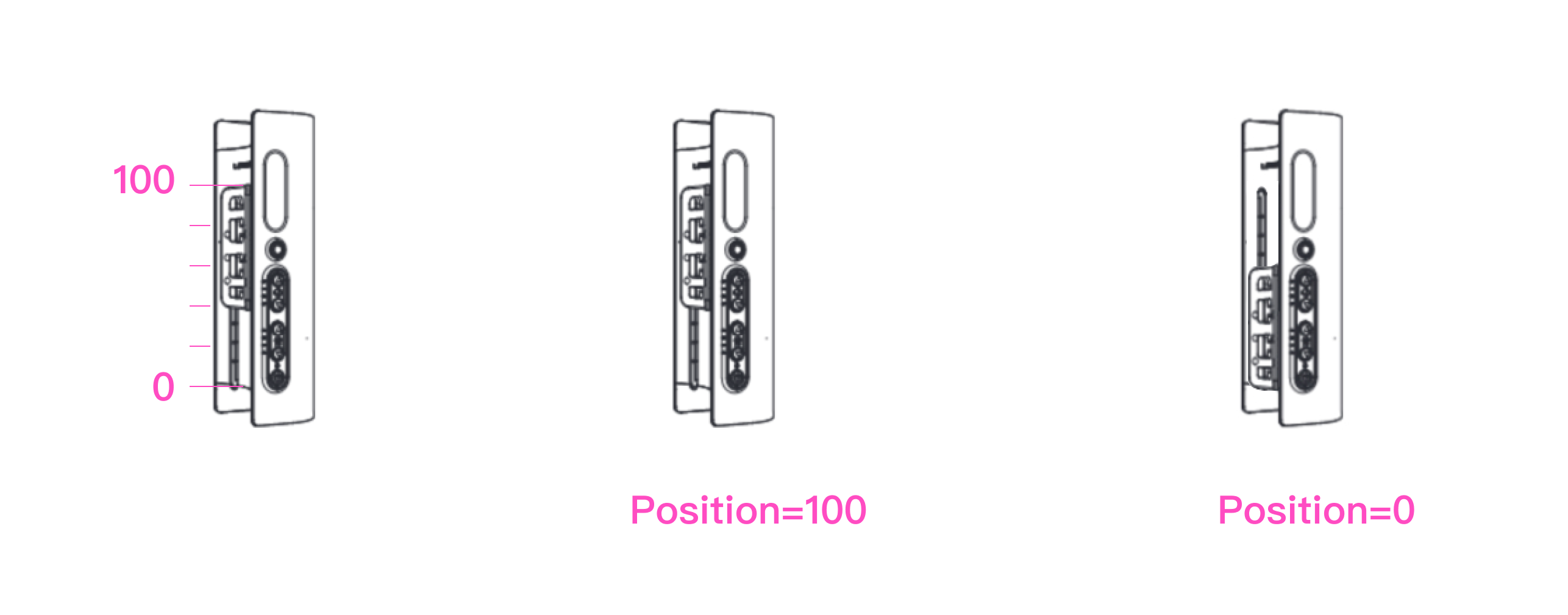
API URL: https://{domain}:{httpsPort}/command
Request protocol: HTTPS Request
Method: POST
Request Content Type: application/json
Response Format: JSON
Parameters:
| Name | Description | Type | Note | Required |
|---|---|---|---|---|
| command | Type of request | string | / | yes |
| value | The position of the stroker | string | value: 0\~100 | yes |
| toy | Toy ID | string / array | If you don’t include this, it will apply to all connected toys. For version 7.71.0 and above, an array of toy IDs can be sent in this request. | no |
| apiVer | The version of the request | int | Always use 1 | yes |
Request Example:
{
  "command": "Position",
  "value": "38", //0\~100
  "toy": "ff922f7fd345", // If you don’t include this, it will be applied to all connected Solace Pro
  "apiVer": 1
}
{
  "code": 200,
  "type": "ok"
}
- The stroker will continue moving 300 miliseconds after a position command is executed. If a new command is received during this time, it will be executed immediately. The more frequently commands are sent, the smoother the stroker movement will be.
- It takes about 1 to 2 seconds for the stroker to reach the desired speed from rest. During this time, the stroker may not closely match the desired movement.
Pattern Request
If you want to change the way the toy responds very frequently you can use a pattern request. To avoid network pressure and obtain a stable response, use the commands below to send your predefined patterns at once.
API URL: https://{domain}:{httpsPort}/command
Request protocol: HTTPS Request
Method: POST
Request Content Type: application/json
Response Format: JSON
Headers:
| Name | Description | Note | Required |
|---|---|---|---|
| X-platform | The name of your application | Will be displayed on the Lovense Remote screen. | yes |
Parameters:
| Name | Description | Type | Note | Required |
|---|---|---|---|---|
| command | Type of request | string | / | yes |
| rule | "V:1;F:v,r,p,t,f,s,d,o;S:1000#" V:1; Protocol version, this is static; F:v,r,p,t,f,s,d,o; Features: v is vibrate, r is rotate, p is pump, t is thrusting, f is fingering, s is suction, d is depth, o is oscillate, this should match the strength below. F:; Leave blank to make all functions respond; S:1000; Intervals in Milliseconds, should be greater than 100. | string | The strength of r and p, d will automatically correspond to v. | yes |
| strength | The pattern For example: 20;20;5;20;10 | string | No more than 50 parameters. Use semicolon ; to separate every strength. | yes |
| timeSec | Total running time | double | 0 \= indefinite length Otherwise, running time should be greater than 1. | yes |
| toy | Toy ID | string / array | If you don’t include this, it will apply to all toys. For version 7.71.0 and above, an array of toy IDs can be sent in this request. | no |
| apiVer | The version of the request | int | Always use 2 | yes |
Request Example:
// Vibrate the toy as defined. The interval between changes is 1 second. Total running time is 9 seconds.
{
  "command": "Pattern",
  "rule": "V:1;F:v;S:1000#",
  "strength": "20;20;5;20;10",
  "timeSec": 9,
  "toy": "ff922f7fd345",
  "apiVer": 2
}

// Vibrate the toys as defined. The interval between changes is 0.1 second. Total running time is 9 seconds.
// If the toys include Nora or Max, they will automatically rotate or pump, you don't need to define it.
{
  "command": "Pattern",
  "rule": "V:1;F:v,r,p;S:100#",
  "strength": "20;20;5;20;10",
  "timeSec": 9,
  "apiVer": 2
}
PatternV2 Request
The 2nd version of the Pattern Request includes four operations: Setup, Play, Stop, and SyncTime. For version 7.71.0 and above, it works with all Lovense toys. For version 7.70.0 and below, it is only available for the position control of the Solace Pro. It is suitable for scenarios with a predefined pattern. If real-time control of position is needed, suggest to use Position Request.
Setup
Set up a predefined pattern.
API URL: https://{domain}:{httpsPort}/command
Request protocol: HTTPS Request
Method: POST
Request Content Type: application/json
Response Format: JSON
Parameters:
| Name | Description | Type | Note | Required |
|---|---|---|---|---|
| command | Type of request | string | / | yes |
| type | Type of operation | string | / | yes |
| actions | [{"ts":0,"pos":10},{"ts":100,"pos":100},{"ts":200,"pos":10},{"ts":400,"pos":15},{"ts":800,"pos":88}] | array of object | Each action consists of a timestamp (in ms) and a corresponding position value (0\~100). - ts: Must be greater than the previous one and the maximum value is 7200000. Invalid data will be removed. - pos: The value range is 0\~100. Invalid data will be removed. | yes |
| apiVer | The version of the request | int | Always use 1 | yes |
Request Example:
{
  "command": "PatternV2",
  "type": "Setup",
  "actions": [
    { "ts": 0, "pos": 10 },
    { "ts": 100, "pos": 100 },
    { "ts": 200, "pos": 10 },
    { "ts": 400, "pos": 15 },
    { "ts": 800, "pos": 88 }
  ],
  "apiVer": 1
}
{
  "code": 200,
  "type": "ok"
}
Play
Play the predefined pattern.
API URL: https://{domain}:{httpsPort}/command
Request protocol: HTTPS Request
Method: POST
Request Content Type: application/json
Response Format: JSON
Parameters:
| Name | Description | Type | Note | Required |
|---|---|---|---|---|
| command | Type of operation | string | / | yes |
| type | Type of operation | string | / | yes |
| startTime | The start time of playback | int | The value range is 0\~7200000 (in ms). If you don’t include this, it will start playing from 0. | no |
| offsetTime | The client-server offset time | int | Set the client-server offset time to ensure that the toy is synchronized with the client. The value range is 0\~15000 (in ms). If you don’t include this, it will be set to 0. | no |
| timeMs | Total running time | double | timeMs must be at least greater than 100, otherwise it will be ignored. | no |
| toy | Toy ID | string / array | If you don’t include this, it will be applied to all connected toys. For version 7.71.0 and above, an array of toy IDs can be sent in this request. | no |
| apiVer | The version of the request | int | Always use 1 | yes |
Request Example:
{
  "command": "PatternV2",
  "type": "Play",
  "toy": "ff922f7fd345",
  "startTime": 100,
  "offsetTime": 300,
  "apiVer": 1
}
{
  "code": 200,
  "type": "ok"
}
InitPlay
Set up a predefined pattern and play it automatically once it is loaded.
API URL: https://{domain}:{httpsPort}/command
Request protocol: HTTPS Request
Method: POST
Request Content Type: application/json
Response Format: JSON
Parameters:
| Name | Description | Type | Note | Required |
|---|---|---|---|---|
| command | Type of request | string | / | yes |
| type | Type of operation | string | / | yes |
| actions | [{"ts":0,"pos":10},{"ts":100,"pos":100},{"ts":200,"pos":10},{"ts":400,"pos":15},{"ts":800,"pos":88}] | array of object | Each action consists of a timestamp (in ms) and a corresponding position value (0\~100). - ts: Must be greater than the previous one and the maximum value is 7200000. Invalid data will be removed. - pos: The value range is 0\~100. Invalid data will be removed. | yes |
| offsetTime | The client-server offset time | int | Set the client-server offset time to ensure that the toy is synchronized with the client. The value range is 0\~15000 (in ms). If you don’t include this, it will be set to 0. | no |
| startTime | The start time of playback | int | The value range is 0\~7200000 (in ms). If you don’t include this, it will start playing from 0. | no |
| toy | Toy ID | string / array | If you don’t include this, it will be applied to all connected toys. For version 7.71.0 and above, an array of toy IDs can be sent in this request. | no |
| stopPrevious | Stop and clear all previous commands and execute current commands | int | Default: 0, If set to 1 , it will stop and clear the previous command. | yes |
| apiVer | The version of the request | int | Always use 1 | yes |
Tips
- The InitPlay API is available in the version 7.76.0 for Android and iOS.
- InitPlay is the auto-play version of PatternV2 Setup + Play. No need to use them together.
- If a command is executing, new commands will be added to the queue and played in order.
- The actions will begin playing from the time (startTime + offsetTime).
Request Example:
{
  "command": "PatternV2",
  "type": "InitPlay",
  "actions": [
    {
      "ts": 0,
      "pos": 10
    },
    {
      "ts": 1000,
      "pos": 20
    },
    {
      "ts": 2000,
      "pos": 30
    },
    {
      "ts": 3000,
      "pos": 40
    },
    {
      "ts": 4000,
      "pos": 50
    },
    {
      "ts": 5000,
      "pos": 60
    },
    {
      "ts": 6000,
      "pos": 70
    },
    {
      "ts": 7000,
      "pos": 80
    },
    {
      "ts": 9000,
      "pos": 90
    }
  ],
  "startTime": 0,
  "offsetTime": 0,
  "stopPrevious": 0,
  "apiVer": 1
}
{
  "code": 200,
  "type": "ok"
}
Stop
Stop playing the predefined pattern.
API URL: https://{domain}:{httpsPort}/command
Request protocol: HTTPS Request
Method: POST
Request Content Type: application/json
Response Format: JSON
Parameters:
| Name | Description | Type | Note | Required |
|---|---|---|---|---|
| command | Type of operation | string | / | yes |
| type | Type of operation | string | / | yes |
| toy | Toy ID | string / array | If you don’t include this, it will be applied to all connected toys. For version 7.71.0 and above, an array of toy IDs can be sent in this request. | no |
| apiVer | The version of the request | int | Always use 1 | yes |
Request Example:
{
  "command": "PatternV2",
  "type": "Stop",
  "toy": "ff922f7fd345",
  "apiVer": 1
}
{
  "code": 200,
  "type": "ok"
}
SyncTime
Use SyncTime to help you calculate the offset time from the server. Before sending the request, record the time T1; once you receive a successful response to the request, record the time T2. The estimated offset can then be calculated: offsetTime \= (T2 - T1).
API URL: https://{domain}:{httpsPort}/command
Request protocol: HTTPS Request
Method: POST
Request Content Type: application/json
Response Format: JSON
Parameters:
| Name | Description | Type | Note | Required |
|---|---|---|---|---|
| command | Type of operation | string | / | yes |
| type | Type of operation | string | / | yes |
| apiVer | The version of the request | int | Always use 1 | yes |
Request Example:
{
  "command": "PatternV2",
  "type": "SyncTime",
  "apiVer": 1
}
{
  "code": 200,
  "type": "ok"
}
Preset Request
API URL: https://{domain}:{httpsPort}/command
Request protocol: HTTPS Request
Method: POST
Request Content Type: application/json
Response Format: JSON
Headers:
| Name | Description | Note | Required |
|---|---|---|---|
| X-platform | The name of your application | Will be displayed on the Lovense Remote screen. | yes |
Parameters:
| Name | Description | Type | Note | Required |
|---|---|---|---|---|
| command | Type of request | string | / | yes |
| name | Preset pattern name | string | We provide four preset patterns in the Lovense Remote app: pulse, wave, fireworks, earthquake | yes |
| timeSec | Total running time | double | 0 \= indefinite length Otherwise, running time should be greater than 1. | yes |
| toy | Toy ID | string / array | If you don’t include this, it will be applied to all toys. For version 7.71.0 and above, an array of toy IDs can be sent in this request. | no |
| apiVer | The version of the request | int | Always use 1 | yes |
Request Example:
// Vibrate the toy with pulse pattern, the running time is 9 seconds.
{
  "command": "Preset",
  "name": "pulse",
  "timeSec": 9,
  "toy": "ff922f7fd345",
  "apiVer": 1
}

Response Example:

{
  "code": 200,
  "type": "ok"
}
| Code | Message |
|---|---|
| 500 | HTTP server not started or disabled |
| 400 | Invalid Command |
| 401 | Toy Not Found |
| 402 | Toy Not Connected |
| 403 | Toy Doesn't Support This Command |
| 404 | Invalid Parameter |
| 506 | Server Error. Restart Lovense Connect. |
Standard API Demo
https://developer.lovense.com/standard-api-demo-game-mode